# Install/run via GitHub Actions

## Prerequisites

* **Bito Access Key:** Obtain your Bito Access Key. [**View Guide**](/help/account-and-settings/access-key.md)
* **GitHub Personal Access Token (Classic):** For GitHub PR code reviews, ensure you have a CLASSIC personal access token with repo access. We do not support fine-grained tokens currently. [**View Guide**](https://docs.github.com/en/authentication/keeping-your-account-and-data-secure/managing-your-personal-access-tokens#creating-a-personal-access-token-classic)

<figure><img src="/files/SfNBlF93B77ELFhO2Svr" alt=""><figcaption><p><strong>GitHub Personal Access Token (Classic)</strong></p></figcaption></figure>

***

## Installation and Configuration Steps:

1. **Enable GitHub Actions:**
   * Login to your [GitHub](https://github.com/) account.

   * Open your repository and click on the "Settings" tab.

     <figure><img src="/files/Wl4UmfqFyC3b8lLinrHz" alt=""><figcaption></figcaption></figure>

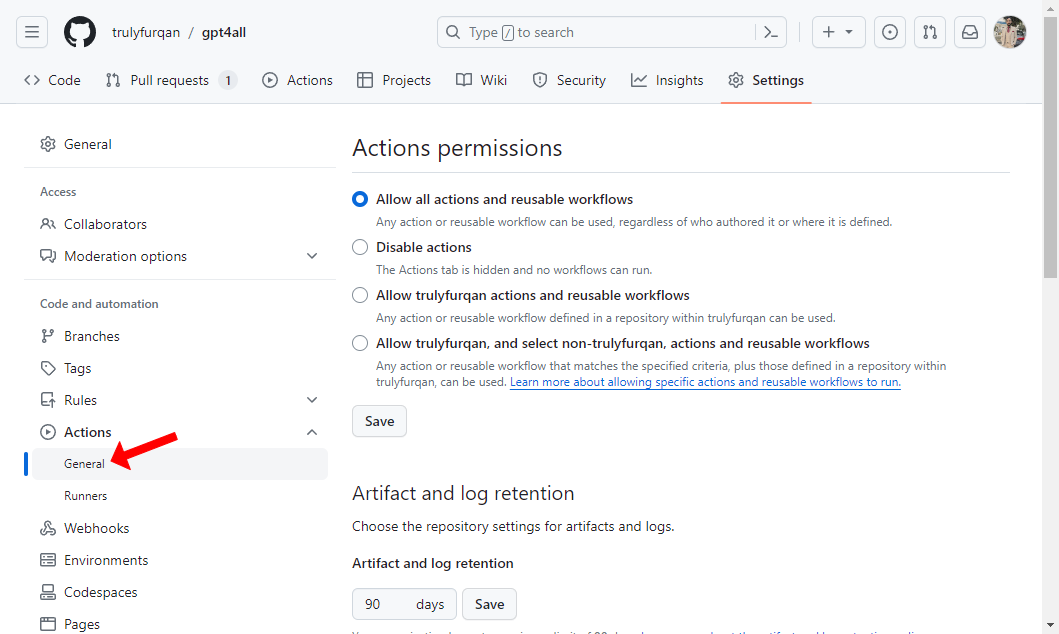
   * Select "Actions" from the left sidebar, then click on "General".

     <figure><img src="/files/fMt3fVW2ZKQKgdMG9Jx8" alt=""><figcaption></figcaption></figure>

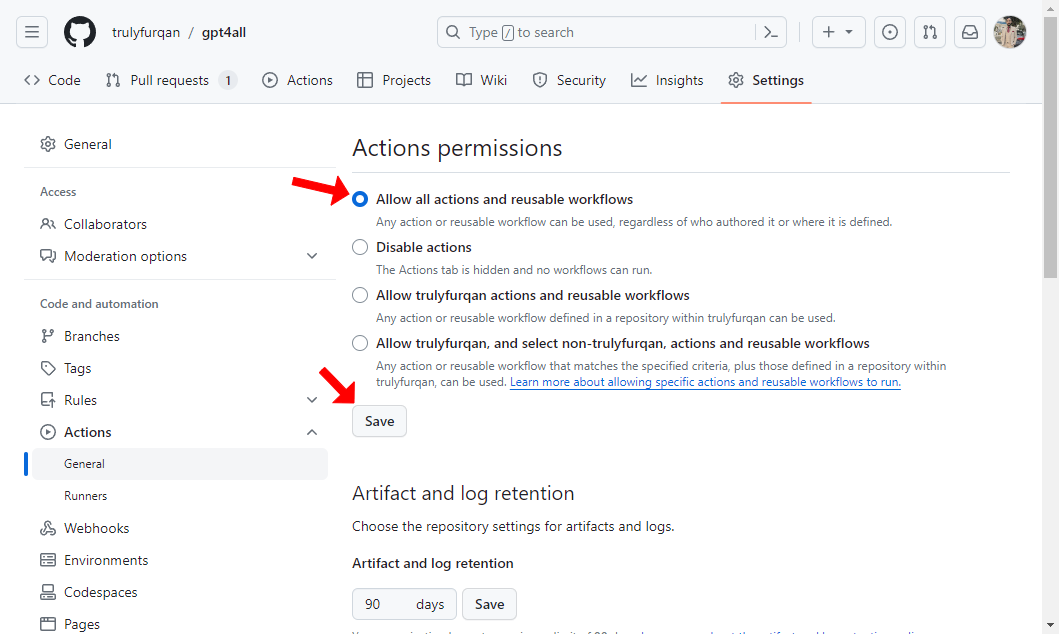
   * Under "Actions permissions", choose "Allow all actions and reusable workflows" and click "Save".

     <figure><img src="/files/jGo2kStdSPGqc0Jvpaj1" alt=""><figcaption></figcaption></figure>

2. **Set Up Environment Variables:**
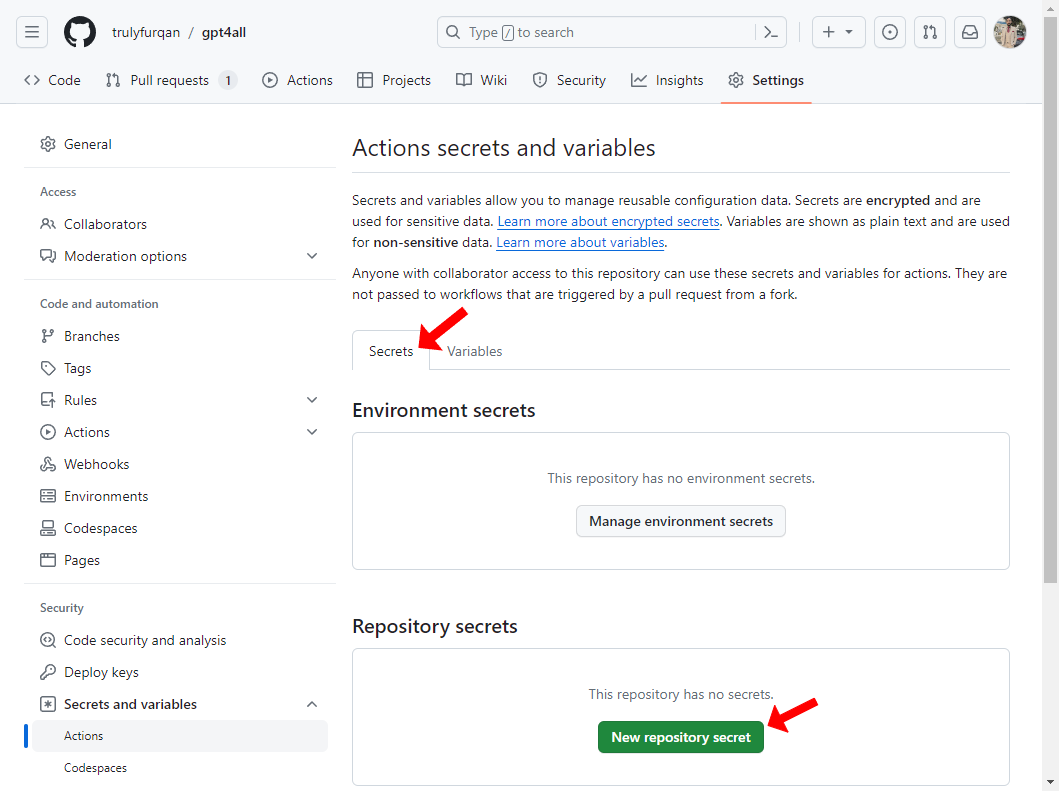
   * Still in the "Settings" tab, navigate to "Secrets and variables" > "Actions" from the left sidebar.

     <figure><img src="/files/w4dgSJg1uilWVCK2VJ9w" alt=""><figcaption></figcaption></figure>

   * **Configure the following under the "Secrets" tab:**

     For each secret, click the **New repository secret** button, then enter the exact name and value of the secret in the form. Finally, click **Add secret** to save it.

     * **Name:** `BITO_ACCESS_KEY`
       * **Secret:** Enter your Bito Access Key here. Refer to the [guide for obtaining your Bito Access Key](/help/account-and-settings/access-key.md#creating-an-access-key).
     * **Name:** `GIT_ACCESS_TOKEN`
       * **Secret:** Enter your GitHub Personal Access Token (Classic) with repo access. We do not support fine-grained tokens currently. For more information, see the [Prerequisites](#prerequisites) section.

{% hint style="info" %}
Check the above ["Prerequisites"](#prerequisites) section to learn more about creating the access tokens needed to configure the Agent.
{% endhint %}

<figure><img src="/files/o12KItFlZYd29tPqsK8Y" alt=""><figcaption></figcaption></figure>

<figure><img src="/files/ojBD4nYxxCzqUHDF0vKO" alt=""><figcaption></figcaption></figure>

<figure><img src="/files/khsND4oVQbXTT6rOaFYF" alt=""><figcaption></figcaption></figure>

* **Configure the following under the "Variables" tab:**

  For each variable, click the **New repository variable** button, then enter the exact name and value of the variable in the form. Finally, click **Add variable** to save it.

  * **Name:** `STATIC_ANALYSIS_TOOL`
    * **Value:** Enter the following text string as value: `fb_infer,astral_ruff,mypy`
  * **Name:** `GIT_DOMAIN`
    * **Value:** Enter the domain name of your Enterprise or self-hosted GitHub deployment or skip this if you are not using Enterprise or self-hosted GitHub deployment.
    * **Example of domain name:** `https://your.company.git.com`
  * **Name:** `EXCLUDE_BRANCHES`
    * **Value:** Specify branches to exclude from the review by name or valid glob/regex patterns. The agent will skip the pull request review if the source or target branch matches the exclusion list.
    * **Note:** For more information, see [**Source or Target branch filter**](/ai-code-reviews-in-git/excluding-files-folders-or-branches-with-filters.md#source-or-target-branch-filter).
  * **Name:** `EXCLUDE_FILES`
    * **Value:** Specify files/folders to exclude from the review by name or glob/regex pattern. The agent will skip files/folders that match the exclusion list.
    * **Note:** For more information, see [**Files and folders filter**](/ai-code-reviews-in-git/excluding-files-folders-or-branches-with-filters.md#files-and-folders-filter).
  * **Name:** `EXCLUDE_DRAFT_PR`
    * **Value:** Enter `True` to disable automated review for draft pull requests, or `False` to enable it.
    * **Note:** For more information, see [**Draft pull requests filter**](/ai-code-reviews-in-git/excluding-files-folders-or-branches-with-filters.md#draft-pull-requests-filter).

<figure><img src="/files/o6CqSBPO2Ogtn9hl7KpU" alt=""><figcaption></figcaption></figure>

<figure><img src="/files/SXgJ4rmMsR77qI4cVYvt" alt=""><figcaption></figcaption></figure>

<figure><img src="/files/e25JwQmAS05gHQQTwGQ1" alt=""><figcaption></figcaption></figure>

3. **Create the Workflow Directory:**
   * In your repository, create a new directory path: `.github/workflows`.

     <figure><img src="/files/ixoNqedZkTRifbNg1UrR" alt=""><figcaption></figcaption></figure>

4. **Add the Workflow File:**
   * [**Download this `test_cra.yml` file**](https://github.com/gitbito/codereviewagent/blob/main/.github/workflows/test_cra.yml) from AI Code Review Agent's GitHub repo.

     <figure><img src="/files/qop5WolcZTH2wge6QUMo" alt=""><figcaption></figcaption></figure>

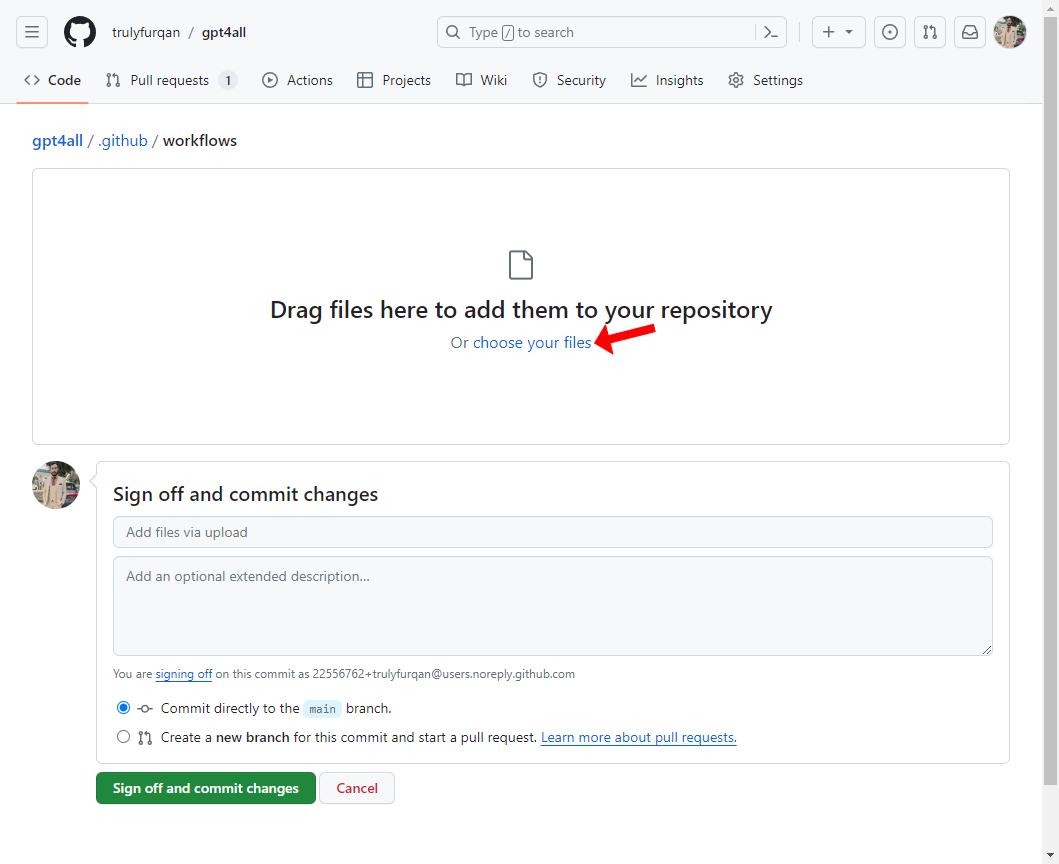
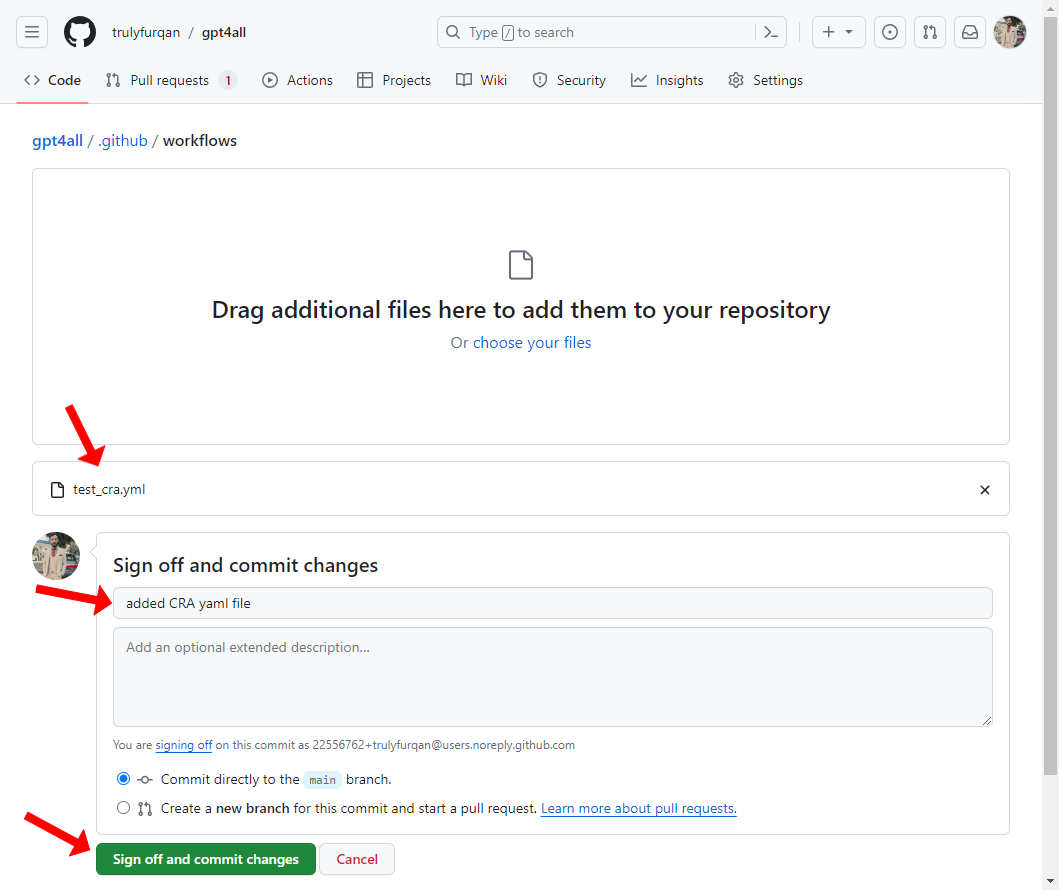
   * In your repository, upload this `test_cra.yml` file inside the `.github/workflows` directory either in your source branch of each PR or in a branch (e.g. main) from which all the source branches for PRs will be created.

     <figure><img src="/files/Qw6iN0GQ88qHsti9NcGQ" alt=""><figcaption></figcaption></figure>

     <figure><img src="/files/ArjDd6hXxy5auIiKZMXz" alt=""><figcaption></figcaption></figure>

     <figure><img src="/files/kjJcIn5NnsCsvAtNZGkS" alt=""><figcaption></figcaption></figure>

   * Commit your changes.

     <figure><img src="/files/dhJAVjFj8yp6PQFOqjhP" alt=""><figcaption></figcaption></figure>

     <figure><img src="/files/kGbLRebN5YoG09DJbDso" alt=""><figcaption></figcaption></figure>

## Customizations for self-hosted GitHub

1. Create a self-hosted Runner using Linux image and x64 architecture as described in the [**GitHub documentation**](https://docs.github.com/en/actions/hosting-your-own-runners/managing-self-hosted-runners/adding-self-hosted-runners).
2. Create a copy of Bito's repository [**gitbito/codereviewagent**](https://github.com/gitbito/CodeReviewAgent) main branch into your self-hosted GitHub organization e.g. "myorg" under the required name e.g. "gitbito-bitocodereview". In this example, now this repository will be accessible as "myorg/gitbito-bitocodereview".
3. Update `test_cra.yml`as below:
   * **Change line from:**
     * runs-on: ubuntu-latest
   * **to:**
     * runs-on: \<label of the self-hosted GitHub Runner> e.g. self-hosted, linux etc.
4. Update `test_cra.yml`as below:
   * **Replace all lines having below text:**
     * uses: gitbito/codereviewagent\@main
   * **with:**
     * uses: myorg/gitbito-bitocodereview\@main
5. Commit and push your changes in `test_cra.yml` .

## Using the AI Code Review Agent

After configuring the GitHub Actions, you can invoke the AI Code Review Agent in the following ways:

{% hint style="info" %}
**Note:** To improve efficiency, the AI Code Review Agent is disabled by default for pull requests involving the **"main"** branch. This prevents unnecessary processing and token usage, as changes to the **"main"** branch are typically already reviewed in release or feature branches. To change this default behavior and include the **"main"** branch, please [**contact support**](mailto:support@bito.ai).
{% endhint %}

1. **Automated Code Review**: The agent will automatically review new pull requests as soon as they are created and post the review feedback as a comment within your PR.
2. **Manually Trigger Code Review:** To start the process, simply type **`/review`** in the comment box on the pull request and submit it. This command prompts the agent to review the pull request and post its feedback directly in the PR as a comment.

   Bito also offers specialized commands that are designed to provide detailed insights into specific areas of your source code, including security, performance, scalability, code structure, and optimization.

   * **`/review security`:** Analyzes code to identify security vulnerabilities and ensure secure coding practices.
   * **`/review performance`:** Evaluates code for performance issues, identifying slow or resource-heavy areas.
   * **`/review scalability`:** Assesses the code's ability to handle increased usage and scale effectively.
   * **`/review codeorg`:** Scans for readability and maintainability, promoting clear and efficient code organization.
   * **`/review codeoptimize`:** Identifies optimization opportunities to enhance code efficiency and reduce resource usage.

   By default, the **`/review`** command generates inline comments, meaning that code suggestions are inserted directly beneath the code diffs in each file. This approach provides a clearer view of the exact lines requiring improvement. However, if you prefer a code review in a single post rather than separate inline comments under the diffs, you can include the optional parameter: **`/review #inline_comment=False`**

   For more details, refer to [Available Commands](/ai-code-reviews-in-git/available-commands.md).

   <figure><img src="/files/lkQNyYW8TqkKSYHzOWCb" alt=""><figcaption></figcaption></figure>

{% hint style="info" %}
It may take a few minutes to get the code review posted as a comment, depending on the size of the pull request.
{% endhint %}

## Screenshots

### Screenshot # 1

{% hint style="info" %}
*AI-generated pull request (PR) summary*
{% endhint %}

<figure><img src="/files/RxexT09jakJeCJTjyOlI" alt=""><figcaption></figcaption></figure>

### Screenshot # 2

{% hint style="info" %}
**Changelist** showing key changes and impacted files in a pull request.
{% endhint %}

<figure><img src="/files/B546WeVmhUFbAADtHF5M" alt=""><figcaption><p>Changelist in AI Code Review Agent's feedback.</p></figcaption></figure>

### Screenshot # 3

{% hint style="info" %}
*AI code review feedback posted as comments on the pull request.*
{% endhint %}

<figure><img src="/files/OYJFi6UdihvkgDkblsaV" alt=""><figcaption></figcaption></figure>


---

# Agent Instructions: Querying This Documentation

If you need additional information that is not directly available in this page, you can query the documentation dynamically by asking a question.

Perform an HTTP GET request on the current page URL with the `ask` query parameter:

```
GET https://docs.bito.ai/ai-code-reviews-in-git/install-run-as-a-self-hosted-service/install-run-via-github-actions.md?ask=<question>
```

The question should be specific, self-contained, and written in natural language.
The response will contain a direct answer to the question and relevant excerpts and sources from the documentation.

Use this mechanism when the answer is not explicitly present in the current page, you need clarification or additional context, or you want to retrieve related documentation sections.